Here's how to handle Google reviews for car detailers: ask every customer soon after the job, send your review link in one message, and offer nothing in return. That fits Google's policy and the UK's fake-review rules, which came into force in April 2025.
How do you get Google reviews for car detailers the right way?
Four habits cover it.
- Get your review link. Google's help page says you can ask customers to use a Google link or QR code to leave a review, and your Google Business Profile shows you how to create one (Google Business Profile Help).
- Ask the same day, by message. A WhatsApp message to the customer while the car still looks its best is easy to answer on a phone.
- Ask every customer, not a hand-picked few. More on why below.
- Reply to every review, good or bad. Google's help page points to how to read and reply to reviews.
A message you could use: "Thanks for choosing me today. However the job went, an honest review helps other local drivers pick a detailer. Here's the link: [your link]". That wording is ours, not Google's. It doesn't promise anything and it doesn't steer the answer.
If you use Proofolio, you can add its review link to the same message. More on that further down. A message with both links: "Thanks for choosing me today. However the job went, an honest review helps other local drivers pick a detailer. Google review: [your Google link]. Review on my Proofolio page: [your Proofolio link]". That's our wording too, and it doesn't promise anything or steer the answer.
Can you give a discount or a freebie for a Google review?
No. Google's help page says: "Offering incentives, like free or discounted goods or services, in exchange for customers to post reviews, change reviews, or remove negative reviews is considered fake & misleading content and is strictly prohibited." Google's separate content policy lists the same thing under rating manipulation (Google Maps contributed content policy).
UK law is looser than Google here. The UK regulator, the Competition and Markets Authority (CMA), says in its fake-reviews guidance (dated 4 April 2025) that a trader may incentivise reviews, for example by offering a discount or a free product. Its words: "Traders are free to do this but to comply with the law they must: (a) tell consumers that the review has been incentivised, and (b) the review must still reflect the reviewer's genuine experience" (CMA208, paragraph 3.7).
The same guidance says: "While it is not prohibited per se to publish an incentivised review, many publication media (for example, websites, platforms etc.) do not allow incentivised reviews" (paragraph 3.4). Google is one of them. So on Google, a free wax for a five-star review is out, whatever UK law allows. We'd offer nothing in return, and Proofolio's own terms ban offering incentives for positive reviews.
Can you only ask your happy customers?
We wouldn't. A lot of review advice says to ask the customers you know are pleased. The CMA guidance describes cherry-picking positive reviews as something that "might be done either through suppressing negative reviews that have been submitted or by encouraging just those who are satisfied to leave reviews" (paragraph 4.5). It also says a trader may break the law by selectively promoting positive reviews (paragraph 4.3), and lists "arbitrarily stopping and starting review invitations" among things traders should not do (paragraph 4.4).
Google's policy points the same way. Its rating manipulation list includes: "Discourage or prohibit negative reviews, or selectively solicit positive reviews from customers".
The CMA also gives the other side. It says traders may want to encourage reviews, and that doing so "without predetermining the contents or sentiment expressed in the review, for example by merely emailing customers generally to ask if they wish to provide a review, is not prohibited under the banned practice" (CMA208, paragraph 3.6). That is why asking every customer the same way is the safe route.
That's our reading, and the CMA says a trader "may" infringe the law, not that every informal ask does. This is general information, not legal advice. The simple fix is to send the same message to every customer.
Who shouldn't write your reviews?
You, your staff, your family and your friends. The CMA guidance gives a trader asking a member of staff to write a review as an example of commissioning one: "It could include a trader requesting a member of staff to write a review of the trader's product." Google's policy bans content "based on a conflict of interest", which it says may include "current or former employment, a contractual or consultory relationship, or other professional or personal affiliations that demonstrate a conflict of interest (such as industry competitors, familial relationships, etc.)".
What should you do about a bad review?
Reply to it, and don't try to make it disappear. The CMA says "suppressing genuine negative reviews is problematic". It says traders should not "limit access to and/or the impact of negative reviews by editing, withholding or removing such reviews", although it adds that suppressing fake negative reviews is important. Google adds that offering an incentive to change or remove a negative review is prohibited.
A calm, factual reply that says what you'll do about the problem is something the next customer can read.
What do the UK rules say, and who can fine you?
The fake-reviews ban sits in the Digital Markets, Competition and Consumers Act 2024. The CMA's guidance covers fake reviews, concealed incentivised reviews and publishing reviews in a misleading way. On 7 April 2025 the government said the new consumer protection provisions were "now in force". The same release says: "if a company infringes consumer protection law, the CMA can fine them up to 10% of their global turnover" (GOV.UK, 7 April 2025).
That line is about companies. We haven't found a source that says how it applies to a sole trader, so we won't guess. If you're unsure where you stand, ask a solicitor or Citizens Advice.
What can you and can't you do, at a glance?
| What you do | What the sources say |
|---|---|
| Ask every customer the same way | CMA guidance warns against encouraging just satisfied customers to review. Google's policy lists selectively soliciting positive reviews. |
| Offer a discount or freebie for a review | Google says it is strictly prohibited, so on Google it's out. UK law is looser: a disclosed, genuine incentivised review isn't banned (CMA208, paragraphs 3.4 and 3.7). Proofolio's terms ban incentives for positive reviews. |
| Write your own, or ask staff, family or friends to | The CMA gives asking staff as an example of commissioning. Google bans reviews based on a conflict of interest. |
| Hide, edit or chase off a bad review | The CMA says traders should not limit access to genuine negative reviews. Google prohibits incentives to change or remove them. |
| Reply to every review | Google's help page points to how to read and reply to reviews. |
Will customers actually leave a review if you ask?
Nearly all say they read them, and some say they'll always write one if asked. We couldn't find a UK survey on this, so here is a US one. In its 2026 survey of 1,002 US adult consumers, BrightLocal, a company that sells local SEO software, found that 97% read reviews for local businesses. It also reported that 28% say they will "always" write a review if asked (BrightLocal, Local Consumer Review Survey 2026).
What US consumers say about reviews of local businesses
The same page says: "In fact, 83% of people asked to leave a review went on to leave one this year." These are self-reported answers from US consumers, so treat them as a rough guide for UK drivers. They don't say how many of your customers will respond.
How does Proofolio help you ask for reviews?
Proofolio (proofolio.pro) is a service for tradespeople that works over WhatsApp. You send your job photos, and it sends back finished image cards, captions for each platform, a short video and a portfolio page you can link to. You check them, and nothing posts unless you say so.
It also gives you a review link for each job. Tap Finish on your job page and Proofolio makes a link that is unique to that job. A panel gives you a ready-to-send message with a Copy button, and you may also get a WhatsApp message with the link. Forward it to the customer, and they can leave a star rating and a comment. The link works once and expires after 14 days. The review then shows on your Proofolio portfolio page, which grows with every job you add. Only the customer's first name and last initial are shown.
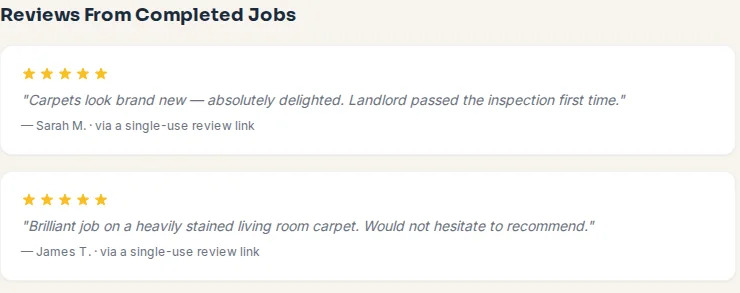
You can't pick which reviews appear. If one isn't from a real customer, has abusive or unlawful content, or is a duplicate or a technical error, you can flag it and the Proofolio team decides. The review stays up until they do. That's deliberate: hiding genuine reviews is what the CMA guidance above warns about. You can reply to a review from your job page, and your reply shows under the review on your portfolio page.
Google reviews and Proofolio reviews are two separate things. Google reviews show up on Google Maps and Search. Proofolio reviews show up on your portfolio page. A Proofolio review doesn't appear on, or count towards, your Google Business Profile, and Proofolio's link doesn't collect Google reviews for you. If you want reviews on Google, you still need to send your Google link. You can send both links in one message, or either on its own. Say which is which, so the customer knows what they're tapping.
See how it works, look at an example portfolio page, or check the pricing. For the photos themselves, read our guide to before and after car detailing photos. For the bigger picture, see car detailing social media marketing. Ready to try it? Try Proofolio free: send your first job photos on WhatsApp.
Common Questions
Can I offer a discount for a Google review?
No, not on Google. Google's help page says offering incentives, like free or discounted goods or services, in exchange for customers to post reviews, change reviews, or remove negative reviews is strictly prohibited. UK law is looser: the CMA says a trader may incentivise reviews if they tell people the review was incentivised and it still reflects a genuine experience (CMA208, paragraph 3.7). But many platforms don't allow incentivised reviews (paragraph 3.4), and Google is one of them. Proofolio's terms also ban incentives for positive reviews.
Can I only ask customers who were happy with the job?
We wouldn't. The CMA's guidance says cherry-picking positive reviews might be done by encouraging just those who are satisfied to leave reviews, and Google's policy lists selectively soliciting positive reviews. Send the same message to every customer: the CMA says asking customers generally, without predetermining what they say, is not prohibited (CMA208, paragraph 3.6). This is general information, not legal advice.
Can I ask staff, friends or family to write reviews for me?
No. The CMA gives a trader asking a member of staff to write a review as an example of commissioning one, and Google's policy bans content based on a conflict of interest, which it says may include employment and family relationships.
How do I get my Google review link?
Create a Google link or QR code in your Google Business Profile, then send it to the customer. Google's help page says you can ask customers to use a Google link or QR code to leave a review.
What should I do about a bad Google review?
Reply to it, and don't try to get a genuine one removed. The CMA says suppressing genuine negative reviews is problematic, although suppressing fake negative reviews is important. Google prohibits offering an incentive to change or remove a negative review.
When did the UK fake-reviews ban start?
The CMA published its fake-reviews guidance on 4 April 2025, and on 7 April 2025 the government said the new consumer protection provisions under the Digital Markets, Competition and Consumers Act 2024 were in force.
Will customers leave a review if I ask?
Often, according to one US survey. In BrightLocal's 2026 survey of 1,002 US adult consumers, 83% of people asked to leave a review went on to leave one. BrightLocal sells local SEO software and the data is US only, so treat it as a rough guide for UK customers.
How do I send customers a review link with Proofolio?
Tap Finish on your job page and Proofolio makes a review link that is unique to that job. A panel gives you a ready-to-send message with a Copy button, and you may also get a WhatsApp message with the link. Forward it to your customer. The link works once and expires after 14 days, and the review then shows on your Proofolio portfolio page.
Can I hide a bad review on Proofolio?
No. You can flag a review only if it isn't from a real customer, has abusive or unlawful content, or is a duplicate or a technical error, and the Proofolio team decides. The review stays up until they do.
Part of our guide: Car Detailing Social Media Marketing: A No-Fluff Guide
Want your own photos turned into marketing like this?
Try Proofolio Free on WhatsAppScan with your phone to start on WhatsApp